











Article Contents
- 1. Key Takeaways
- 2. Why Hosting Is the Foundation of Website Speed
- 3. What TTFB Is and Why It Matters More Than Most People Realize
- 4. How Hosting Plan Type Affects Speed
- 5. Server Hardware - NVMe SSD Storage, CPU and RAM
- 6. Server Location and Geographic Latency
- 7. Caching - What Your Host Controls and What You Control
- 8. CDNs and How They Work Alongside Your Hosting
- 9. How Slow Hosting Affects SEO and Conversions
- 10. How to Diagnose a Hosting Speed Problem
- 11. Is Your Hosting Holding Your Site Back?
- 12. References & Additional Resources
- 13. Tagged In:
Key Takeaways
- Hosting is the foundation of website speed; slow server infrastructure creates a ceiling that no amount of front-end optimization can break through
- TTFB (Time to First Byte) is the most direct hosting speed signal and directly affects LCP, a confirmed Google ranking metric
- Shared hosting pools resources across many sites; traffic spikes from neighboring accounts can slow your site with no warning
- Server hardware including NVMe SSD storage, CPU generation and RAM has a direct and measurable effect on how fast pages are generated and delivered
- Server location matters; physical distance between the server and the visitor adds real latency to every request
- Server-side caching is one of the highest-impact changes you can make, and many budget hosts do not include it
- CDNs reduce load on your origin server and serve static assets from locations closer to visitors, but they do not replace a well-resourced host
- Slow hosting has a direct business cost in lower search rankings, higher bounce rates and lost conversions
Most site owners spend their optimization time in the right general area but at the wrong layer. They compress images, install caching plugins, switch to a lighter theme and run PageSpeed Insights until the score edges up a few points. All of that work is worth doing. But if the server delivering your site is slow, overcrowded or running on outdated hardware, you are building on a weak foundation. The ceiling on your performance is set by your hosting before the browser has loaded a single asset.
Web hosting and website speed are not loosely related topics. They are directly connected through a chain of infrastructure decisions: where your server lives, what hardware it runs on, how many other sites share its resources and what caching layers your provider has built in. Every one of those decisions shapes how quickly a visitor’s browser receives your content. Knowing where hosting fits in that chain means you can stop guessing about what to fix and start with the layer that actually limits everything else.
This guide covers how hosting affects speed at each stage of that chain, from server response time and hardware specs to plan type, server location and the role of a CDN. You will also see how slow hosting connects directly to Core Web Vitals, search rankings and the kind of conversion numbers that actually show up in a business’s bottom line. If you want to start with the basics of what hosting is before going deeper, what web hosting is and how it works and what a web host does for your website are useful starting points.

Why Hosting Is the Foundation of Website Speed
When a visitor types your URL into a browser or clicks a link to your site, a request travels across the internet to the server where your website files live. That server has to receive the request, process it, generate the page and send the response back. Only after all of that does the browser start downloading assets and rendering what the visitor sees. Hosting controls every part of that process before the browser gets involved.
That sequence matters because any slowness at the server level adds to the total time before the visitor sees anything. If your server takes 1.5 seconds to respond, you have already spent more than half of the 2.5-second window Google recommends for your page’s main content to load, and the browser has not even started.
Front-end optimizations like image compression, script deferral and lazy loading are valuable, but they operate downstream. They make the browser’s job more efficient once the server has done its part. They cannot compensate for a slow or overloaded server.
The practical implication is that hosting should be the first thing you evaluate when a site underperforms on speed, not the last. Providers differ in meaningful ways: the hardware in their data centers, the number of sites they pack onto each server, the caching infrastructure they offer and the network capacity available. Understanding those differences is what lets you make an informed choice rather than picking based on price or a recognizable brand name. For a fuller picture of types of web hosting before comparing plans, that guide lays out the landscape clearly.

What TTFB Is and Why It Matters More Than Most People Realize
Time to First Byte (TTFB) measures the elapsed time between a browser sending a page request and receiving the first byte of the server’s response. It is the single metric most directly controlled by your hosting environment, and it is one of the first places to look when a site feels slow. Google’s guidance on TTFB recommends a target of 800 milliseconds or less at the 75th percentile, meaning 75 percent of your visitors should receive the first byte within that window. TTFB values above 1,800 milliseconds are considered poor.
TTFB is not itself a Core Web Vital, but it directly affects Largest Contentful Paint (LCP), which is. LCP measures how long it takes for the largest visible element on a page to render, and Google’s Core Web Vitals documentation sets the good threshold at under 2.5 seconds. The connection is straightforward: LCP cannot be faster than TTFB. If the server takes 1.5 seconds to respond, the browser cannot start loading the page’s main content until at least that point.
According to data from the 2024 Web Almanac, sites with poor LCP scores spend an average of 2.27 seconds on TTFB alone, nearly exhausting the entire LCP budget before rendering has begun.
What drives TTFB at the hosting level is a short and practical list: server hardware performance, the number of concurrent requests the server is handling, database query speed, PHP or runtime version, and whether server-side caching is active.
A well-configured server with modern hardware, a recent PHP version and full-page caching active can deliver TTFB well under 200 milliseconds for cached requests. The same content served from an overloaded shared server with no caching can take ten times as long. That difference is entirely a hosting decision, not a code problem.

How Hosting Plan Type Affects Speed
Not all hosting environments perform the same way, and the differences go well beyond marketing copy. The plan type you choose determines how server resources are allocated to your site, how much isolation you have from other accounts and how predictably your site performs under load. A full breakdown of these options is covered in shared vs VPS vs dedicated hosting, but the speed implications are worth examining directly.
Shared hosting places dozens or hundreds of websites on a single physical server. Everyone on that server shares the same CPU, RAM and disk I/O. When a neighboring site experiences a traffic spike or runs a resource-intensive process, it draws from the same pool your site depends on. The result is unpredictable slowdowns that have nothing to do with your own traffic or code.
This is sometimes called the “noisy neighbor” problem, and it is one of the most common reasons well-optimized sites still show inconsistent performance. Shared hosting works well for low-traffic sites and personal projects, but it introduces a ceiling that cannot be engineered around at the code level.
VPS hosting carves a physical server into isolated virtual environments. Each VPS has a defined allocation of CPU, RAM and storage that other accounts cannot consume. Your performance is more predictable because you are not competing with neighbors for the same pool. Dedicated hosting takes this further by giving you an entire physical server, with no resource contention of any kind. For growing businesses or sites where speed directly affects revenue, the predictability of dedicated resources is often worth the additional cost.
Cloud hosting operates differently again. Instead of a fixed allocation on one machine, cloud environments distribute your site across a pool of interconnected servers and scale resources up or down based on actual demand. That elasticity means traffic spikes are absorbed rather than causing slowdowns. For sites with variable or unpredictable traffic patterns, cloud hosting often delivers more consistent performance than any fixed-resource plan.
Managed hosting adds a layer of professional administration on top of any of these plan types, including performance tuning, caching configuration and monitoring that many site owners do not have the time or expertise to handle themselves.

Server Hardware - NVMe SSD Storage, CPU and RAM
Two hosting plans can carry identical price tags and identical resource allocations on paper while delivering meaningfully different performance because of the hardware running underneath. Storage type is one of the most significant differentiators. Traditional spinning hard drives have read/write speeds measured in hundreds of megabytes per second with latency in the milliseconds. SATA SSDs improve on that significantly. NVMe SSDs go further still, delivering throughput three to ten times higher than SATA drives with dramatically lower latency.
For sites with active databases, the difference shows up in every database query, which means every dynamic page load is faster on NVMe storage.
CPU generation matters in a similar way. Modern processors with higher single-core performance execute PHP, Python and database operations faster than older hardware, even at the same nominal clock speed. A host that has not refreshed its infrastructure in several years may be running hardware that is genuinely slower than what a newer provider offers at a comparable price point.
This is one of the reasons that switching hosts sometimes produces a dramatic performance improvement with no other changes made to the site itself. The site did not get better; the hardware serving it did.
RAM availability is the third pillar. When a server runs short on memory, it begins swapping data to disk, which is far slower. Adequate RAM also supports server-side caching layers like OPcache (which keeps compiled PHP in memory so it does not have to be recompiled on every request), Redis and Memcached. These caching systems keep frequently requested data in memory rather than regenerating it from the database each time.
A server with sufficient RAM can run these layers effectively and deliver cached responses in a fraction of the time an uncached response would take. A server running close to its memory limit cannot.

Server Location and Geographic Latency
Data travels through fiber optic cables at roughly 200,000 kilometers per second, approximately two-thirds the speed of light in a vacuum due to the refractive properties of glass. That sounds fast, but the distances involved in a typical web request add up in ways that are genuinely measurable.
A request from New York to a server in Los Angeles involves approximately 3,940 kilometers of straight-line distance, creating a minimum round-trip latency of around 40 milliseconds. A request from New York to a server in London spans roughly 5,500 kilometers by the shortest route, adding meaningful additional latency on top of that. These are minimums under ideal conditions; real-world latency is higher due to network hops, cable routing paths, congestion and signal regeneration at repeaters. For dynamic content that cannot be cached at an edge location, this latency is paid on every request, by every visitor.
The practical consequence is that a site hosted in Singapore serving primarily European visitors will always carry a geographic speed penalty regardless of how well the server hardware performs. Many site owners make the server location decision once during initial setup and never revisit it, even as the site’s audience grows and shifts. Reviewing where the bulk of your traffic comes from and confirming your server region aligns with that audience is a low-effort check that can produce a meaningful performance improvement.
Server location also interacts with TTFB in a compounding way. A visitor far from your origin server pays the distance penalty before the server even begins processing the request. If the server is also slow to respond, those two sources of latency stack. Conversely, a server close to the visitor with fast hardware and good caching can deliver sub-100 millisecond TTFB for cached content, which gives LCP a significant head start. For sites with a genuinely global audience, a CDN (covered in the next section) provides a practical solution to geographic latency without requiring multiple server deployments.

Caching - What Your Host Controls and What You Control
Caching is not a single thing. It operates at multiple layers, and the most impactful layers are the ones your hosting provider controls, not the ones you configure through a plugin. Server-side caching includes OPcache, which stores compiled PHP bytecode in memory so the server does not have to parse and compile PHP files on every request; Redis and Memcached, which store the results of database queries in memory so they do not have to be re-executed; and full-page caching, which stores a complete HTML copy of a page so the server can deliver it without running PHP or touching the database at all.
The performance gains from full-page caching are substantial. A typical uncached WordPress page with moderate database usage might take 400 to 600 milliseconds to generate. The same page served from a full-page cache can be delivered in under 50 milliseconds.
Many shared hosting plans do not offer Redis or Memcached, and some do not include effective full-page caching either. Caching plugins help to varying degrees, but a plugin cannot replicate what a well-configured server-level cache provides, particularly under load. If your host does not support object caching or server-side caching layers, you are leaving a significant performance improvement on the table.
This is one area where the difference between a managed hosting plan and a basic shared plan shows up most clearly. Good managed hosts configure caching as part of their standard environment, not as an optional extra.
I noticed this firsthand when working with a client whose WordPress site was loading in just under three seconds despite a lightweight theme and heavily optimized images. After enabling Redis object caching and full-page caching at the server level on their VPS, TTFB dropped from around 800 milliseconds to under 120 milliseconds. The rest of the load time improvement followed automatically. No other changes were made to the site itself.
Browser caching, which stores assets on the visitor’s device for repeat visits, is a separate and complementary layer that is worth configuring through cache-control headers. But it does not help first-time visitors and it cannot compensate for a slow origin response.

CDNs and How They Work Alongside Your Hosting
A content delivery network (CDN) is a geographically distributed network of servers that store cached copies of your site’s static assets, including images, CSS files, JavaScript and sometimes full HTML pages. When a visitor requests your site, the CDN serves those assets from the edge server closest to them rather than from your origin server. This reduces the physical distance data must travel, which directly reduces latency and improves load time, particularly for visitors far from your primary server location. Cloudflare’s caching documentation explains how edge caching works in practice and how cached content is stored and served across distributed locations.
The value of a CDN goes beyond speed. By absorbing a significant portion of your traffic at the edge, a CDN also reduces the volume of requests hitting your origin server. That reduction lowers server load, which improves performance for the dynamic requests that cannot be cached, such as authenticated pages, checkout flows and personalized content. For media-heavy sites or sites with a genuinely global audience, a CDN is one of the most reliable investments in performance available.
Many managed and cloud hosting plans include CDN integration as a standard feature. On plans that do not, third-party services can be added independently.
One important clarification: a CDN works with your hosting, not instead of it. Dynamic content, database-driven pages and any request that cannot be served from cache still go back to your origin server. If the origin server is slow, visitors loading uncached content will still experience that slowness. The CDN helps by reducing how often that happens and by serving cached content faster in the meantime, but it is not a substitute for a well-resourced, properly configured hosting environment.
Think of it as a force multiplier rather than a fix for underlying infrastructure problems. For context on how connecting your domain to your host affects the routing layer that makes CDN integration work, see how to connect domain and hosting and what DNS is and how it works.

How Slow Hosting Affects SEO and Conversions
The business consequences of slow hosting are well-documented and they compound in ways that go beyond the initial frustration of a sluggish page. According to Hostinger’s website load time statistics, 47 percent of users expect a website to load in two seconds or less, and a significant share abandon a site that takes longer than three seconds. That bounce does not just represent a lost visit. It signals to Google that your page did not meet the user’s expectations, which feeds into behavioral signals that influence rankings over time.
Google’s Core Web Vitals are the formal mechanism through which hosting quality affects search rankings. The three metrics are Largest Contentful Paint (LCP, good threshold under 2.5 seconds), Interaction to Next Paint (INP, good threshold under 200 milliseconds) and Cumulative Layout Shift (CLS, good threshold under 0.1). Google evaluates these at the 75th percentile of real user data collected through Chrome, meaning your ranking is influenced by how the slowest quarter of your visitors experience your site.
Slow hosting most directly damages LCP, since a high TTFB from an overloaded or underpowered server raises the LCP floor before any other performance factor is involved. A server that consistently takes 1.5 seconds to respond cannot produce an LCP under 2.5 seconds without an aggressive caching strategy in front of it.
The conversion impact is equally concrete. Research has consistently shown that a one-second delay in page load time can reduce conversions by around seven percent. For an e-commerce site doing meaningful volume, that figure is not academic. It is a direct revenue calculation.
Upgrading from shared hosting to a VPS or managed plan that includes better hardware, server-side caching and a CDN is a cost, but it is a cost with a return. When the alternative is losing a measurable percentage of conversions on every visit because the server is slow, hosting quality becomes a business decision rather than a technical preference. For guidance on evaluating hosting plans relative to what you need and what you will actually pay, how much web hosting should cost and how to choose the right web hosting provider are useful next steps.

How to Diagnose a Hosting Speed Problem
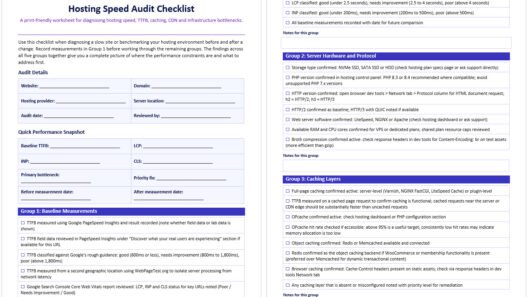
The first diagnostic step is checking TTFB. Tools like Google PageSpeed Insights and GTmetrix both report server response time as part of their analysis. If your TTFB is consistently above 800 milliseconds on uncached requests, hosting is a primary suspect.
Run the test from multiple locations if possible, since a result that looks acceptable from one region may be significantly slower for visitors further from your server. If cached pages return a fast TTFB but uncached pages are slow, the problem is likely in your application layer, database queries or caching configuration, all of which your host can help address.
The second step is identifying what resource constraint is causing the slowness. On shared hosting, the constraint is often a hard cap on CPU usage, concurrent connections or memory that the plan does not allow you to exceed. On a VPS or dedicated server, it is more often a configuration issue: an unoptimized database, a missing caching layer or a PHP version that has not been updated.
Understanding which category your problem falls into helps you decide whether you need to optimize your current environment or move to a different plan. If your site has grown substantially since you first set up hosting and you are still on the same shared plan you started with, that gap between current needs and current resources is often the entire explanation for performance problems.
If you are ready to make a change, how to select the best hosting plan for your needs walks through the key criteria for matching a plan to your actual workload. For beginners who are still building a picture of what they need, which hosting service is best for beginners keeps the decision grounded in practical tradeoffs rather than technical jargon. And if your concern is speed after a hosting move, the connection between DNS propagation timing and how quickly your new host takes over is covered in how to point a domain to a web host.
Is Your Hosting Holding Your Site Back?
If your site feels slower than it should, the problem may not be in the code or the content. It may be in the infrastructure serving it. Slow TTFB, inconsistent performance under load and Core Web Vitals scores that do not move despite optimization work are all signs that the hosting environment itself needs attention. A performance audit that starts at the server level rather than the front end often finds the real bottleneck faster.
At Web Hosting Services, we help businesses identify where hosting is limiting performance and what to do about it, whether that means a configuration change on the current plan, an upgrade to a VPS or managed environment, or a full migration to a host better suited to the site’s actual needs. If your site’s speed is costing you rankings or conversions, contact us and share what you are running on. We will tell you exactly what is slowing things down and what the realistic fix looks like.
References & Additional Resources
- Google. “Time to First Byte (TTFB).” web.dev. https://web.dev/articles/ttfb
- Google. “Understanding Core Web Vitals and Google Search Results.” Google Search Central. https://developers.google.com/search/docs/appearance/core-web-vitals
- Google. “Web Vitals.” web.dev. https://web.dev/articles/vitals
- HTTP Archive. “Performance.” Web Almanac 2024. https://almanac.httparchive.org/en/2024/performance
- Cloudflare. “Cloudflare Cache.” Cloudflare Developer Documentation. https://developers.cloudflare.com/cache/
- Hostinger. “Website Load Time Statistics 2026.” https://www.hostinger.com/tutorials/website-load-time-statistics
- Google. “PageSpeed Insights.” https://pagespeed.web.dev/
Tagged In:
- Choosing Hosting, Cloud Hosting, CPU Resources, Hosting Fundamentals, Hosting Infrastructure, Hosting Performance, Hosting Plans, Hosting Reliability, Hosting Servers, Hosting Speed, Managed Hosting, Page Load Time, Server Hardware, Server Performance, Server Resources, Shared Hosting, Site Speed, VPS Hosting, Website Latency, Website Performance

Founder & Web Hosting Specialist
Email Mendy | More About Mendy
With over 15 years in web hosting, digital marketing, and site management, Mendy Perlman has seen what happens when hosting decisions go wrong - and how to prevent it. He specializes in the full stack of website longevity: domain systems, DNS configuration, hosting environments, server performance, and SEO-friendly architecture.
His work isn't theoretical. It's built from years of managing real sites, under real traffic, for real clients across a wide range of industries. This site exists to share what he's learned clearly, honestly, and without the marketing spin.
Areas of Expertise
- Web Hosting & Server Management
- DNS Configuration & Domain Systems
- Website Performance Optimization
- SEO-Friendly Site Architecture
- Digital Marketing & Web Design
- CMS Platforms (WordPress, Shopify, Webflow, Wix, Squarespace, etc.)
Tools & Platforms
- cPanel / WHM - industry-standard hosting control panel
- Apache / Nginx / LiteSpeed - core web server platforms
- Cloudflare / BunnyCDN / KeyCDN - CDN, DNS, and security management
- Cloudflare WAF - web application firewall & threat protection
- GoDaddy / Namecheap - domain registration and management
- MXToolbox - email and DNS diagnostics
- WordPress - CMS powering 40%+ of the web
- Webflow / Squarespace / Wix - website builders and CMS platforms
- WP Rocket / W3 Total Cache - caching and performance optimization
- Google Analytics / GA4 - site traffic and performance tracking
- Google Search Console - SEO health and indexing monitoring
- GTmetrix / Google PageSpeed Insights - site speed diagnostics
- Ahrefs / SEMrush - SEO analysis and keyword research
- Screaming Frog - technical SEO crawling and auditing
- SSL/TLS (Let's Encrypt / Comodo) - secure certificate management
- Sucuri / Wordfence - website security and firewall protection
- UptimeRobot - uptime monitoring and alerts

