















How to Select the Best Hosting Plan for Your Needs

Picking a hosting plan is not about finding the most features for the lowest price. It is about matching a specific set of requirements to the environment most likely to meet them reliably.
How to Select the Best Hosting Plan for Your Needs How to Select the Best Hosting Plan for Your Needs
Learn how to select the best hosting plan for your website based on site type, traffic, storage, performance requirements and budget. A clear, practical framework with no fluff.

Key Takeaways

  • The right hosting plan starts with a clear picture of your site type, expected traffic and technical requirements; not a price comparison
  • Shared hosting suits low-traffic sites; VPS is the right step up when you need predictable resources; dedicated fits high-volume or high-control requirements
  • Traffic estimates should include realistic peak scenarios, not just monthly averages; a spike that exceeds your plan’s capacity is as disruptive as consistently high traffic
  • Storage requirements are driven by content type; a text-heavy blog needs far less than a media site, ecommerce catalog or site that stores user files
  • “Unlimited” plans are a marketing term; every host enforces resource limits through fair use policies and throttling
  • Managed hosting adds operational value on top of any plan tier; worth the premium when server maintenance would otherwise fall to you
  • Choosing a plan with a clear upgrade path is as important as choosing the right plan today; a migration forced by outgrowing a dead-end plan costs more than paying slightly more upfront

Most people approach hosting plan selection the wrong way. They open a comparison page, sort by price and pick the plan that looks like the best deal. The problem is that “best deal” is meaningless without a clear picture of what the plan needs to actually do.

A shared plan at $5 per month is a great deal if it comfortably handles your site. It is a poor deal if your site outgrows it in six months and you spend a weekend migrating to a VPS. A more expensive plan that includes the resources, caching infrastructure and support your site genuinely needs is often the more cost-efficient choice over a two-year horizon.

This guide works through the hosting plan selection process in the right order. Start with requirements, match them to a plan type, read the specifications honestly and then compare costs. If you want foundational context before going further, what web hosting is and how it works and why you need a web host for a website cover the basics. For a full comparison of provider options once you know what you need, how to choose the right web hosting provider is the natural next step.

This section explains why identifying your website's purpose and content type is the essential first step in selecting the right hosting plan before comparing any providers or prices.
Your site type determines your resource profile before you look at a single hosting plan.

Start With Your Site Type, Not a Plan Comparison

Before comparing plans, you need a clear picture of what your site is and what it does. Different site types have fundamentally different resource profiles, and a plan that works well for one is often wrong for another.

A static brochure site with a few pages and no database activity consumes very little server resource. A WordPress blog with dozens of plugins, an active comments section and moderate traffic places a meaningfully higher load on the server. A WooCommerce store processing real transactions during peak hours needs consistent database performance, adequate RAM and reliable uptime during checkout flows.

A membership platform with gated content, user accounts and frequent database queries is more demanding still. A custom web application or SaaS product has requirements that go beyond what a standard shared plan can deliver.

The questions to answer before looking at any pricing page are straightforward. Is your site mostly static or does it generate pages dynamically on every request? Does it process payments or store user data? How database-intensive is the application? Will you be hosting email on the same account? Are there specific PHP version or software requirements?

Writing down honest answers to those questions gives you a requirements profile. That profile is what you match against plan specifications, not the other way around. A broader overview of how different hosting environments are designed for different site types is covered in types of web hosting explained.

This section explains how to realistically estimate monthly website traffic and peak traffic scenarios so you can match your hosting plan to your actual capacity needs rather than overpaying or underprovisioning.
Monthly averages tell part of the story; peak traffic is what actually tests your plan's limits.

Estimating Traffic - The Number That Drives Everything Else

Traffic volume is one of the most direct inputs into hosting plan selection. It determines how much bandwidth you consume, how hard your server’s CPU and RAM work and whether the environment you are on can maintain acceptable performance under load.

For new sites, realistic estimates by site type are a useful starting point. A new blog typically starts in the low hundreds of pageviews per month and may reach several thousand within its first year, depending heavily on content frequency, SEO strategy and promotion. A local business site with some SEO effort might see 1,000 to 5,000 monthly visitors within the first year. A growing ecommerce store with active marketing can reach 20,000 to 100,000 monthly pageviews depending on the category and competition.

These are starting estimates, not targets. The more important question is where you realistically expect to be in twelve months and whether your chosen plan can handle that growth without requiring a disruptive migration.

Monthly averages only tell part of the story. Peak traffic scenarios matter as much, sometimes more. A product launch, a seasonal sale, a viral social post or a media mention can multiply your normal traffic temporarily. If your plan cannot absorb that spike, your site goes down or slows to a crawl at exactly the moment you most need it to perform.

As a practical rule, a well-configured shared hosting plan from a quality provider can comfortably handle up to 50,000 monthly visitors, with some plans handling significantly more depending on site optimization and provider infrastructure. For sites that expect significant traffic spikes or are approaching that range, a VPS or cloud environment provides more headroom. Add a 50% buffer to your traffic estimate before selecting a plan; it is a small cost for a meaningful margin of safety.

This section explains how to calculate realistic disk space requirements for different website types, including the impact of media files, databases, email hosting and backups on total storage needs.

Storage - What You Actually Need and What You Do Not

Storage requirements vary enormously by site type. Understanding what actually consumes disk space on your hosting account helps you avoid both underprovisioning and paying for storage you will never use.

A text-heavy blog with no video and modest image use typically occupies 1 to 3 gigabytes including the database. A small business site with a few dozen pages and standard images is in a similar range. These sites are comfortable on even a modest storage allocation.

A growing ecommerce catalog with hundreds of product images, customer data and order history is a different picture. Storage needs can reach 10 to 20 gigabytes or more depending on catalog size and image resolution. Sites that host user-uploaded content, serve video or audio files, or maintain extensive downloadable resources need to plan more carefully.

When estimating your storage needs, account for all the things living in your hosting account: site files and code, the database, email inboxes (if hosted on the same account), media uploads and backups stored locally on the server. Local backups in particular can consume significant space; many sites double their storage footprint because backup files accumulate without a retention policy.

The “unlimited storage” claim that appears on many shared hosting plans deserves skepticism. Every provider enforces resource limits through fair use policies and terms of service. Accounts that consume excessive disk space or disk I/O relative to their plan tier can be throttled or flagged. Treat “unlimited” as “we will not meter it until you become a problem” rather than a genuine technical guarantee.

This section explains how to match shared hosting, VPS hosting, dedicated hosting and cloud hosting to specific website requirements based on traffic volume, resource needs, technical control and budget.
Plan type is the most consequential hosting decision; everything else operates within the ceiling it sets.

The Plan Type Decision - A Practical Framework

Once you have a requirements profile, matching it to a plan type is more straightforward than most hosting comparisons make it appear. The key variables are traffic volume, resource predictability needs, technical control requirements and budget.

Shared hosting is the right environment for low-traffic sites that do not process transactions, do not require dedicated resources and are at an early stage where cost efficiency matters most. Personal blogs, portfolio sites, small business brochure sites and simple informational sites all fit comfortably in this category. The provider handles server maintenance and the cost is low. The tradeoff is a shared resource pool and a performance ceiling that becomes relevant as traffic grows.

VPS hosting is the right step up when predictable resource allocation matters. Each VPS has a defined allocation of CPU, RAM and storage that neighboring accounts cannot consume. This makes performance more consistent and gives you more control over server configuration. It suits growing sites, ecommerce stores with consistent transaction volume, sites that have hit the limits of a shared plan and projects that need specific software configurations.

Dedicated hosting provides an entire physical server for a single account. There is no resource sharing of any kind. It is appropriate for high-traffic sites, applications with intensive CPU or memory requirements, environments with compliance or isolation requirements and organizations that need hardware-level control. It is the most expensive tier and relevant for a relatively small proportion of sites.

Cloud hosting distributes your site across a pool of interconnected servers that scale dynamically with demand. Elastic scaling means traffic spikes are absorbed without manual intervention. It is well suited to sites with variable or unpredictable traffic, modern application architectures and businesses that need geographic redundancy. Pricing is typically consumption-based rather than a flat monthly fee, which introduces flexibility but also requires monitoring to avoid unexpected bills.

Managed hosting is a service layer that sits on top of any of these plan types. A managed environment means the provider handles ongoing server operations; updates, security monitoring, performance tuning, backups and support that goes beyond basic infrastructure. It costs more, but it removes operational responsibility from your plate. The detailed comparison of how these plan types differ in practice is covered in shared vs VPS vs dedicated hosting.

This section explains how to assess the server performance requirements of different website types, including the role of CPU, RAM, storage type, server-side caching and server location in meeting those requirements.
Performance requirements vary significantly by site type; knowing yours before you buy prevents paying for the wrong thing.

Performance Requirements by Site Type

Performance requirements are not the same across all sites, and understanding what your specific site actually needs helps you compare plans more honestly than a headline spec sheet allows.

Static pages with minimal database interaction place very little load on the server. Each request is simple: retrieve a file and send it. Dynamic pages that query a database, run application logic and assemble a response on every visit place significantly higher CPU and RAM demands on the server. The more plugins, custom queries and complex templates your site runs, the more relevant RAM and CPU performance become.

Database-intensive sites benefit specifically from adequate RAM for object caching. Systems like Redis and Memcached keep the results of frequent database queries in memory so they do not have to be re-executed on every request. This dramatically reduces server load and improves response time. Whether a plan includes these caching layers is a meaningful spec difference, not a minor feature.

Storage type also matters for database performance. NVMe SSD storage delivers significantly faster read/write speeds than SATA SSD and far faster than traditional hard disk drives. For sites with active databases, the difference is measurable in page generation time. When a provider specifies NVMe storage, that is a concrete infrastructure detail worth noting.

Server location relative to your primary audience affects every request through unavoidable network latency. A server in the United States serving primarily European visitors adds latency that good hardware cannot eliminate. Confirm that a provider has data centers in or near your audience’s region before committing. For a full breakdown of how each of these factors compounds into real-world site speed, how web hosting impacts website speed covers the complete picture.

This section explains the difference between managed and unmanaged hosting, what operational responsibilities each model places on the site owner, and when the premium cost of managed hosting represents genuine value.
Unmanaged hosting is cheaper on paper; the real cost is measured in time and expertise.

Managed vs Unmanaged - Deciding Who Handles the Work

Every hosting plan exists on a spectrum from fully unmanaged to fully managed. Where a plan falls on that spectrum determines what you are responsible for and what the provider handles on your behalf.

On an unmanaged plan, you own the operational side. That means server software updates, security patching, monitoring, backup configuration, performance tuning and troubleshooting when something breaks. If you have the technical knowledge and the time to do this well, unmanaged hosting is cost-effective. If you do not, it is an ongoing liability.

On a managed plan, the provider takes responsibility for the operational layer. They run updates, monitor the environment, configure backups, respond to security alerts and handle the routine maintenance that keeps a server healthy. You pay more per month, but you buy back the time and expertise those tasks require.

The real cost comparison is not the monthly fee. It is the monthly fee plus the value of the time you would otherwise spend on server administration. For many businesses without in-house technical staff, a managed plan is the more cost-efficient choice even at a higher price point.

I have seen this play out directly with clients who chose unmanaged VPS plans to save $20 or $30 per month. Within a few months, several were spending multiple hours each month on tasks that a managed plan would have handled automatically. The time cost far exceeded the savings.

In one case, a missed security patch led to a compromise that cost significantly more to remediate than a year of managed hosting fees would have. If you are genuinely comfortable managing a server and have time to do it consistently, unmanaged is a legitimate choice. If you are not, the managed premium is worth taking seriously rather than optimizing away.

More detail on what managed hosting includes and who it suits best is in what managed hosting means and who needs it.

This section explains how to interpret hosting plan specifications including CPU allocation, RAM, storage type, bandwidth limits and unlimited claims so you can compare plans on equal and accurate terms.
The numbers on a hosting plan page mean something specific; knowing what they mean prevents expensive mismatches.

Reading a Hosting Plan Specification Honestly

Hosting plan pages are designed to present specifications favorably. Reading them accurately requires knowing what the numbers actually mean rather than how they are intended to land.

CPU allocation on shared plans is rarely expressed in terms you can meaningfully compare. “Unlimited CPU” on a shared plan means you share a pool with other accounts and your usage may be throttled at the provider’s discretion. On VPS plans, CPU cores or vCPUs are more specific; a 2-core VPS provides two virtual CPU cores for your exclusive use.

RAM is one of the more honest specifications. A VPS plan listing 2GB or 4GB RAM is telling you what your environment has available. For a WordPress site with moderate traffic and no object caching, 1 to 2GB of RAM is functional. For a site running Redis, multiple active plugins and higher concurrent traffic, 4GB or more provides meaningful headroom.

Storage type makes a real difference. NVMe SSD outperforms SATA SSD by a significant margin for database operations. SATA SSD outperforms HDD by an even wider margin. When a plan does not specify the storage type, ask. The omission is often a signal.

Bandwidth and data transfer specifications range from genuinely metered limits to “unmetered” to “unlimited.” Metered means a hard cap; exceeding it costs extra or throttles your site. Unmetered means the provider does not count it, but fair use policies apply and excessive usage may trigger action. True unlimited is rare and effectively does not exist on shared infrastructure.

The “unlimited” label on storage, bandwidth and email accounts is a consistent source of confusion for buyers. Every provider sets limits; the label means they do not advertise them prominently. Reading the acceptable use policy or terms of service reveals what those limits actually are and under what conditions your account can be throttled or suspended.

This section explains how to calculate the true two-year cost of any hosting plan by accounting for introductory pricing, renewal rates, add-on costs and the potential cost of migrating from a plan that no longer fits.
The advertised price and the real price are rarely the same; calculate both before committing.

Budget - Calculating Real Cost Over Two Years

Hosting plan pricing follows a consistent industry pattern: deeply discounted introductory rates for the first term and significantly higher renewal rates thereafter. Increases of two to four times the introductory price are standard at major providers.

Comparing plans on introductory price alone produces a misleading picture. The formula for a more honest comparison is straightforward. Add the total cost of the first billing term to the total cost of one renewal term. Divide by the combined number of months. That is your real average monthly cost over two years.

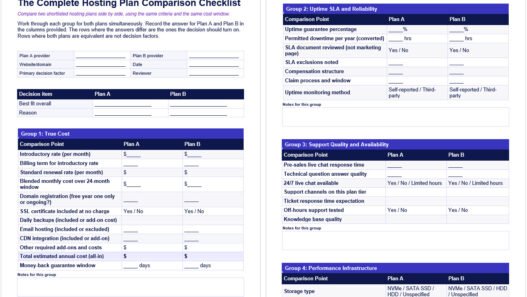
Beyond the renewal rate, map out what is and is not included in the base plan price. SSL certificates should be included at no extra cost on any credible modern host. Daily automated backups are included on some plans and a paid add-on on others. Email hosting is often included on shared plans but excluded from managed WordPress plans. Domain registration is commonly offered free for the first year and billed separately at renewal rates thereafter. CDN integration is standard on some plans and an upsell on others.

Build a complete picture of total annual cost for everything your site needs before comparing plans side by side. Two plans with similar headline prices can differ significantly in real cost once add-ons are accounted for.

There is also a cost to choosing a plan that is too small. Migrating a site to a different host or a different plan tier takes time, carries risk and sometimes requires downtime. That cost is real even if it does not appear on a pricing page.

Paying slightly more for a plan with room to grow and a clear upgrade path is often cheaper over a two-year horizon than picking the smallest option and migrating later. Full guidance on what different plan types should realistically cost is covered in how much web hosting should cost and how website hosting fees are calculated.

This section explains the most common signs that a hosting plan no longer fits a website's needs, including slow server response times, resource limit errors, downtime during traffic spikes and inconsistent performance.
Recognizing the signals early means you can upgrade on your terms rather than in response to a crisis.

Signs You Are on the Wrong Plan

Even a well-chosen plan can become the wrong plan as a site grows. Recognizing the signals early gives you time to plan a transition rather than reacting to a crisis.

Consistently slow Time to First Byte (TTFB) despite having implemented caching and optimization is one of the clearest signals. If server response is slow even for cached content, the environment is likely under-resourced for your current load. Tools like Google PageSpeed Insights report TTFB directly; Google’s guidance on TTFB thresholds recommends under 800 milliseconds at the 75th percentile.

Hitting resource limits is another clear signal. On shared hosting, this often surfaces as CPU throttling notices from your host, memory limit errors in WordPress, or 503 errors during traffic spikes. On a VPS, it surfaces as consistently high RAM or CPU utilization in server monitoring dashboards.

Downtime or severe slowdowns during traffic volumes that should be manageable is a plan-fit problem rather than a configuration problem. A promotional email going out to a modest list should not take your site down.

Support telling you to upgrade without diagnosing a specific constraint is worth treating with skepticism. Ask what specific resource is being exhausted and whether configuration changes on the current plan could resolve it before agreeing to an upgrade. Sometimes the issue is genuinely a resource ceiling. Sometimes it is a misconfigured plugin, an unoptimized database or a caching layer that was never set up properly.

When the constraint is genuinely the plan, the right response is an upgrade with a clear understanding of what resource the new plan provides more of. Moving from shared to VPS for more RAM and CPU, or from VPS to cloud for elastic scaling during unpredictable traffic, are logical progressions. Moving to a more expensive plan within the same tier without a specific resource justification is not a solution.

Not Sure Which Plan Fits What You Are Building?

Selecting the right hosting plan is a decision that rewards a structured approach and gets more straightforward once you have mapped out your actual requirements. The work is in the assessment; the plan selection follows naturally from it.

At Web Hosting Services, we help businesses work through this assessment and identify the plan type, resource level and management model that fits their specific site. No generic comparisons; just a clear recommendation based on what you are actually running and where you realistically need to be in twelve months. If you want that kind of direct input, contact us and describe your site. We will give you a straight answer.

References & Additional Resources

  1. Google. “Time to First Byte (TTFB).” web.dev. https://web.dev/articles/ttfb
  2. Google. “Understanding Core Web Vitals and Google Search Results.” Google Search Central. https://developers.google.com/search/docs/appearance/core-web-vitals
  3. WordPress.org. “Requirements.” https://wordpress.org/about/requirements/
  4. Google. “PageSpeed Insights.” https://pagespeed.web.dev/

Disclaimer: This content is for informational purposes only. Hosting plan specifications, pricing, renewal rates and resource limits vary by provider and change over time. Traffic estimates and storage guidelines are general benchmarks; actual requirements depend on your specific site, application and usage patterns. Always verify current plan details directly with the hosting provider before purchasing.

Author Profile
Mendy Perlman of Web Hosting Services (webhostingservices.co)

Founder & Web Hosting Specialist

Email Mendy | More About Mendy

With over 15 years in web hosting, digital marketing, and site management, Mendy Perlman has seen what happens when hosting decisions go wrong - and how to prevent it. He specializes in the full stack of website longevity: domain systems, DNS configuration, hosting environments, server performance, and SEO-friendly architecture.

His work isn't theoretical. It's built from years of managing real sites, under real traffic, for real clients across a wide range of industries. This site exists to share what he's learned clearly, honestly, and without the marketing spin.

Areas of Expertise

- Web Hosting & Server Management
- DNS Configuration & Domain Systems
- Website Performance Optimization
- SEO-Friendly Site Architecture
- Digital Marketing & Web Design
- CMS Platforms (WordPress, Shopify, Webflow, Wix, Squarespace, etc.)

Tools & Platforms

- cPanel / WHM - industry-standard hosting control panel
- Apache / Nginx / LiteSpeed - core web server platforms
- Cloudflare / BunnyCDN / KeyCDN - CDN, DNS, and security management
- Cloudflare WAF - web application firewall & threat protection
- GoDaddy / Namecheap - domain registration and management
- MXToolbox - email and DNS diagnostics
- WordPress - CMS powering 40%+ of the web
- Webflow / Squarespace / Wix - website builders and CMS platforms
- WP Rocket / W3 Total Cache - caching and performance optimization
- Google Analytics / GA4 - site traffic and performance tracking
- Google Search Console - SEO health and indexing monitoring
- GTmetrix / Google PageSpeed Insights - site speed diagnostics
- Ahrefs / SEMrush - SEO analysis and keyword research
- Screaming Frog - technical SEO crawling and auditing
- SSL/TLS (Let's Encrypt / Comodo) - secure certificate management
- Sucuri / Wordfence - website security and firewall protection
- UptimeRobot - uptime monitoring and alerts

Get practical hosting tips in your inbox

By pressing the Subscribe button, you confirm that you have read and are agreeing to our Privacy Policy and Terms of Use
Add a comment Add a comment

Leave a Reply

Your email address will not be published. Required fields are marked *

Previous Post
Learn which web hosting service is best for beginners, what features actually matter for a first website, what to avoid and how to choose a plan you will not regret when it renews.

Which Hosting Service Is Best for Beginners

Next Post
Monthly Website Hosting Maintenance Checklist: Keep Your Hosting Environment Healthy

Monthly Website Hosting Maintenance Checklist - Free Word and PDF Download