















Article Contents
- 1 Key Takeaways
- 2 Start With What Your Site Actually Needs
- 3 Understand Your Hosting Type Options
- 4 What Uptime Guarantees Actually Mean
- 5 Speed and Server Performance
- 6 Pricing - Introductory Rates vs Real Cost
- 7 Support Quality
- 8 Scalability and Your Growth Path
- 9 The Pre-Purchase Checklist
- 10 Red Flags Worth Knowing Before You Sign Up
- 11 Need Help Choosing the Right Host for Your Site?
- 12 References & Additional Resources
- 13 Tagged In:
Key Takeaways
- Start with your site type and traffic expectations before looking at any provider’s marketing claims
- Hosting plan type matters more than any individual feature – shared, VPS, dedicated, cloud and managed hosting serve genuinely different needs
- A 99.9% uptime guarantee allows up to 8 hours and 45 minutes of downtime per year; read the SLA to understand what is actually excluded
- Introductory pricing commonly doubles or triples at renewal, and sometimes quadruples – calculate your real two-year cost before committing to any plan
- Server location relative to your primary audience has a direct and measurable impact on speed and time to first byte
- Support quality separates good hosts from bad ones; test it with a technical question before you sign up
- Scalability matters – the cheapest plan is only a good deal if you can grow out of it without rebuilding everything from scratch
- Backups, SSL certificates and email hosting are often add-ons; know exactly what is included before you hand over a card
Search for web hosting and the results look the same: low monthly prices, unlimited storage, free domains and 99.9% uptime guarantees. Most of it is marketing language designed to win clicks, not to help you make a good decision.
The actual differences between providers – the ones that determine whether your site loads quickly, stays online reliably and gets real help when something breaks – are buried in the fine print, the renewal pricing page and the support ticket queue.
Choosing the right web hosting provider is not about finding the lowest advertised price. It is about matching your site’s actual requirements to a hosting environment that can meet them, at a cost you can sustain over time. That requires knowing what questions to ask and what answers actually mean.
This guide walks through the full decision in the right order. It starts with understanding what your site needs before looking at any provider, then covers the criteria that genuinely distinguish good hosts from bad ones. If you want to understand why hosting matters to your site’s performance and reliability in the first place, why you need a web host for a website and what web hosting is and how it works are useful starting points before going further.
Start With What Your Site Actually Needs
Every hosting decision should start with the same question: what is this site actually going to do? A personal blog, a business brochure site, a WooCommerce store, a membership platform and a custom web application all have different infrastructure requirements. Buying a plan before you have answered that question means you are picking on price and marketing language rather than fit.
The site type question drives everything else. Static sites with no database activity and modest traffic can run comfortably on basic shared hosting. A WordPress blog with a growing audience needs reliable database performance and enough resources to handle concurrent visitors without slowing down.
An ecommerce site processing real transactions needs consistent uptime, solid database performance and enough server capacity to handle checkout traffic without timeouts. A membership site with user accounts, gated content and regular database queries is more demanding still.
Before you look at a single hosting plan, work through a few practical questions. How many monthly visitors do you realistically expect in the first year, and where might that be in year two? Do you use a CMS like WordPress, or are you building on a custom stack? Does your site process payments or store user data? Do you need professional email at your domain? Is this a new site or an existing one you are migrating?
The answers narrow the field significantly and give you a basis for comparison that is grounded in your actual situation rather than a headline number. From there, what it means to host a website step by step covers the setup process once you have made a choice.
Understand Your Hosting Type Options
The hosting plan type you choose has more influence on your site’s performance than any individual feature a provider advertises. Each model allocates resources differently, offers a different level of isolation from other customers and suits a different stage of site growth. A full breakdown is available in types of web hosting explained and shared vs VPS vs dedicated hosting, but the decision framework is worth covering here.
Shared hosting places your site on a server alongside dozens or hundreds of other accounts. Everyone shares the same CPU, RAM and disk I/O pool. It is affordable and low-maintenance, and it works well for personal sites, small business brochure sites and low-traffic blogs.
The tradeoff is that a neighbor’s traffic spike can slow your site and your resource ceiling is low. It is a good starting point for sites that do not yet have meaningful traffic or complex requirements.
VPS hosting creates isolated virtual environments on shared physical hardware. Your allocation of CPU, RAM and storage is reserved for you and cannot be consumed by other accounts. Performance is more predictable and the resource ceiling is higher. VPS suits growing sites that have outgrown shared plans, businesses that need more server control and ecommerce sites where consistent performance matters.
Cloud hosting goes further by distributing your site across a pool of servers that scale dynamically with demand, which makes it well suited to sites with variable or unpredictable traffic. Dedicated hosting gives you an entire physical server to yourself, which offers the highest performance and isolation, at the highest cost.
Managed hosting is not a separate plan type so much as a service layer. A managed plan means the provider handles ongoing server operations – updates, security monitoring, backups, performance tuning and support – on top of whatever hardware tier you are on.
It costs more because you are paying for labor and expertise, not just infrastructure. For businesses that want solid performance without managing a server, managed hosting often represents genuinely good value when the alternative is your time or a contractor’s hourly rate.
What Uptime Guarantees Actually Mean
Every hosting provider advertises uptime. The numbers look impressive until you convert them into actual time. A 99.9% uptime guarantee – the figure most commonly used in shared and managed hosting marketing – permits up to 8 hours and 45 minutes of downtime per year, or approximately 44 minutes per month. Stepping up to 99.99% reduces that to around 52 minutes per year. The difference between those two numbers is significant for any site where downtime directly costs money.
The headline percentage is only part of the picture. What matters more is what the service level agreement (SLA) actually commits to and what it excludes. Most hosting SLAs exclude scheduled maintenance windows, outages caused by the customer, third-party failures and force majeure events. Those exclusions cover a large share of real-world downtime scenarios.
The credit structure is also worth scrutinizing. A typical hosting SLA compensation is a small account credit – often a percentage of a monthly fee – which provides little meaningful relief for a business that lost hours of sales or leads during an outage.
When evaluating uptime claims, look for specifics: How is downtime measured, and by whom? Does the provider use independent third-party monitoring or their own systems? Is the measurement window monthly or annual? How do you actually file a claim, and is there a time limit?
An SLA that requires you to submit a ticket within 24 hours with documented evidence, for an outage that happened at 2am, is designed around the provider’s interests rather than yours.
I make a habit of reading the actual SLA document before recommending a host to any client. On several occasions the headline guarantee looked strong, but the exclusion list effectively meant that most real-world outages would not qualify for compensation.
That does not automatically disqualify a provider, but it changes how you weigh the uptime claim relative to other factors like their actual track record on independent monitoring platforms and what users report in forums and review sites.
Speed and Server Performance
Hosting speed is determined by a combination of factors that providers do not always advertise clearly. Storage type is one of the most significant. Hard disk drives are the slowest option. SATA SSDs are meaningfully faster. NVMe SSDs deliver throughput three to ten times higher than SATA drives with lower latency, which shows up in database query times and page generation speed on every dynamic request.
When a hosting provider specifies NVMe storage, that is a concrete infrastructure detail worth noting. When they do not specify the storage type at all, that absence is worth asking about.
CPU generation and available RAM shape how quickly the server can generate pages and how many concurrent requests it can handle before queuing. Server-side caching – including OPcache for PHP, Redis or Memcached for object caching, and full-page caching – has a dramatic effect on how fast pages are delivered.
A cached page served from memory can load in under 50 milliseconds. The same page generated fresh from the database might take 500 milliseconds or more. Whether a host includes these caching layers in its standard environment, or treats them as a premium feature, is a meaningful differentiator.
Server location is another factor that is easy to overlook. The physical distance between your server and your visitors creates unavoidable network latency. A host with data centers in the US serving primarily European visitors will always carry a speed penalty that good hardware alone cannot eliminate.
Confirm that a provider has data centers in or near the region where most of your audience is located. For sites with a genuinely global audience, look for providers that include CDN integration in their standard plans. The full picture of how hosting affects page load times is covered in depth in how web hosting impacts website speed.
Pricing - Introductory Rates vs Real Cost
Introductory pricing is the standard model across the hosting industry. A plan advertised at $3 per month during a promotional term may renew at $10, $12 or $15 per month when that term ends. Increases of two to four times the introductory rate are common at major providers.
This is not deceptive in a legal sense – the renewal rate is usually disclosed somewhere – but it is designed around the expectation that most customers will not notice or will find switching too inconvenient to bother. The real annual cost of a hosting plan is the figure you should be budgeting for, not the introductory price.
The formula for calculating true cost is straightforward. Add up what you will pay during the promotional term, then add what you will pay for a comparable renewal period and divide by the total number of months. That blended figure is your real monthly cost.
A plan with a one-year promotional rate of $36 that renews at $120 per year costs an average of $78 per year, or $6.50 per month over two years. That context makes it easier to compare plans honestly. More detailed guidance on what hosting should realistically cost is covered in how much web hosting should cost and how website hosting fees are calculated.
Beyond the renewal rate, check what is and is not included in the base price. Common add-ons that inflate the real cost include domain registration (often free for year one, then priced at standard renewal rates), SSL certificates (included on most mainstream plans now but not all), daily automated backups (sometimes included, sometimes a paid upgrade), professional email hosting (included on many shared plans but often excluded from managed WordPress plans) and site migration assistance.
Build a complete picture of what the plan actually costs for everything your site needs before comparing it against alternatives.
Support Quality
Support quality is the hosting feature that most buyers underweight before purchasing and value most after something goes wrong. The difference between a provider whose support team can diagnose a PHP memory limit issue, an unoptimized database query or a misconfigured caching layer in minutes, versus one that sends scripted responses and escalation tickets that take hours to resolve, is a real operational difference with measurable consequences.
The way to evaluate support before committing is straightforward. Ask a technical question through the pre-sales chat or email channel before you sign up. Ask something specific: how does your platform handle Redis object caching, what PHP versions are available on the plan you are considering, or how would I restore a single database table from a backup rather than the whole site.
The speed of the response, the depth of the answer and whether the person actually understood the question tell you a great deal about what real-world support will look like. If the pre-sales response is slow, generic or clearly from a script, that is what you should expect when you have an actual problem.
Look for 24/7 availability across multiple channels. Live chat is the baseline for any provider worth considering. A host that routes all requests through a ticket system with no live channel is one where response times can stretch hours when your site is down. Phone support is valuable for complex situations and for anyone running a site where downtime has an immediate revenue cost.
Also check independent review platforms and hosting forums for honest accounts of support experiences, filtered for recency. User-reported support experiences from the last twelve months are more reliable than aggregated star ratings.
Scalability and Your Growth Path
The hosting plan that fits your site today may not fit it in twelve months. A personal blog that gains traction, a business site that adds ecommerce functionality or a local service site that starts running paid traffic can all cross the resource limits of an entry-level shared plan faster than expected. Choosing a provider that has a clear, accessible upgrade path means that transition happens smoothly rather than becoming a crisis.
When evaluating providers, ask how plan upgrades work. Can you move from shared to VPS within the same account without a full migration, or does upgrading require you to set up the site from scratch on a new plan? Some managed hosting providers handle upgrades automatically or with minimal effort on your part. Others effectively require you to treat an upgrade as a new hosting setup, which costs time and carries risk. The answer matters more if you expect meaningful growth in the next year or two.
It is also worth thinking about the ceiling of what the provider offers. A host whose highest tier is a mid-range shared plan gives you nowhere to go if your site outgrows it. A host that offers a progression from shared to managed VPS to dedicated or cloud means you can stay with a provider you already understand and trust as your needs grow.
That continuity has real value – your DNS is stable, your support relationship exists and your team already knows the control panel. For guidance on matching a specific plan to your current and near-future needs, how to select the best hosting plan for your needs covers that decision in detail.
The Pre-Purchase Checklist
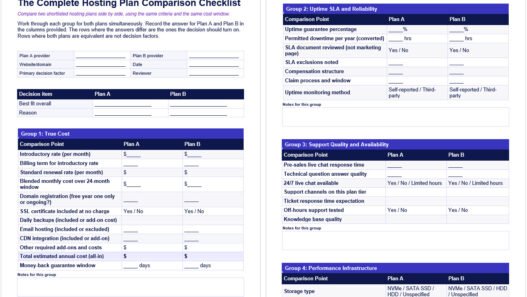
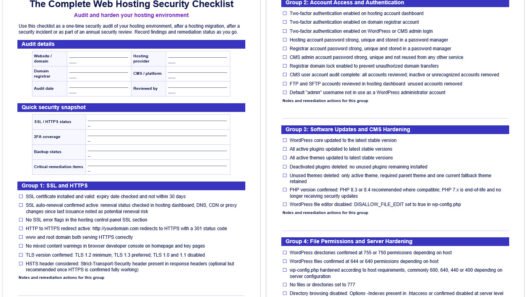
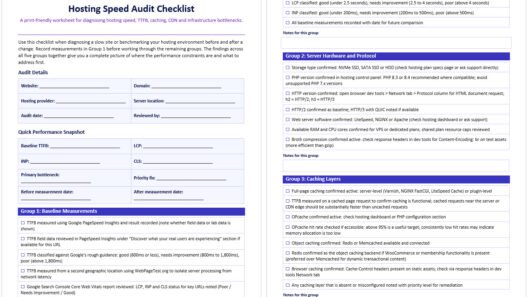
Hosting marketing pages are designed to highlight strengths and obscure gaps. A checklist of specific questions, run against any provider you are seriously considering, gives you a more complete picture before you commit.
Does the plan include email hosting? Many shared plans do, but most managed WordPress plans do not. If you need a professional email address at your domain, confirm this is included or budget for a separate email service.
Are backups automated, how frequently do they run, what is the retention window and how do you restore? Some hosts charge for restores or limit restores to a one-click full-site process that cannot restore individual files or database tables. Know what you are getting before you need it.
Is SSL included at no extra cost? The vast majority of mainstream hosts include free SSL via Let’s Encrypt, but this is worth confirming explicitly.
Is there a staging environment? The ability to test updates, plugin changes or redesigns on a staging copy before pushing them to your live site is a meaningful quality-of-life feature, especially for WordPress sites.
What is the migration policy if you are bringing an existing site? Some hosts offer free assisted migration; others charge for it or provide tools but no hands-on help.
Does the hosting account support two-factor authentication? Account security is a basic requirement that some providers still treat as optional.
Red Flags Worth Knowing Before You Sign Up
Some patterns in hosting marketing and provider behavior are reliable indicators that a provider is likely to disappoint. Renewal pricing that is not clearly disclosed on the pricing page is the most common. If you cannot find the standard renewal rate without digging through terms of service, that is deliberate. Any provider worth trusting makes this information easy to find because they are not embarrassed by it.
“Unlimited” claims without any fair use policy or resource limit disclosure are another signal worth treating with skepticism. No server has unlimited resources. Providers that use this language without qualification typically enforce limits through terms of service that allow them to throttle or suspend accounts that exceed undisclosed thresholds.
What domain hosting is and how it differs from web hosting touches on related clarity issues that affect new site owners making infrastructure decisions for the first time.
A vague or sweeping SLA with extensive exclusions, a money-back window shorter than 30 days, support that is only accessible by ticket with no live channel and a company with no verifiable track record or independent reviews are all worth taking seriously as signals.
None of them is automatically disqualifying in isolation, but a provider that checks several of these boxes at once is unlikely to be a reliable long-term partner. The time to notice these patterns is before your site is live on their infrastructure, not after.
Need Help Choosing the Right Host for Your Site?
Matching the right hosting environment to a specific site is easier when you have someone who has done it across dozens of different setups. The decision involves your site type, your traffic expectations, your technical comfort level, your budget over the full renewal cycle and your tolerance for managing server-level details yourself. Getting that combination right from the start saves a migration later.
At Web Hosting Services, we help businesses work through this decision and set up hosting environments that fit what they are actually building, not just what a sales page made sound appealing. If you want a clear recommendation based on your specific situation rather than a generic comparison chart, contact us and describe what you are working on. We will tell you what fits and what to avoid.
References & Additional Resources
- Wikipedia. “High Availability.” https://en.wikipedia.org/wiki/High_availability
- Google. “Understanding Core Web Vitals and Google Search Results.” Google Search Central. https://developers.google.com/search/docs/appearance/core-web-vitals
- Google. “Time to First Byte (TTFB).” web.dev. https://web.dev/articles/ttfb
- Let’s Encrypt. “Documentation.” https://letsencrypt.org/docs/
Tagged In:
- Beginner Hosting, Choosing Hosting, Cloud Hosting, Hosting Costs, Hosting Decision Making, Hosting Evaluation, Hosting Features, Hosting Fundamentals, Hosting Overview, Hosting Performance, Hosting Plans, Hosting Providers, Hosting Reliability, Hosting Security, Hosting Selection, Hosting Speed, Managed Hosting, Server Resources, Shared Hosting, VPS Hosting, Web Hosting, Website Hosting
Disclaimer: This content is for informational purposes only. Hosting products, pricing, uptime guarantees, SLA terms and features vary by provider and can change over time. Always verify current plan details, renewal rates and service level agreement terms directly with the hosting provider before purchasing.
Founder & Web Hosting Specialist
Email Mendy | More About Mendy
With over 15 years in web hosting, digital marketing, and site management, Mendy Perlman has seen what happens when hosting decisions go wrong - and how to prevent it. He specializes in the full stack of website longevity: domain systems, DNS configuration, hosting environments, server performance, and SEO-friendly architecture.
His work isn't theoretical. It's built from years of managing real sites, under real traffic, for real clients across a wide range of industries. This site exists to share what he's learned clearly, honestly, and without the marketing spin.
Areas of Expertise
- Web Hosting & Server Management
- DNS Configuration & Domain Systems
- Website Performance Optimization
- SEO-Friendly Site Architecture
- Digital Marketing & Web Design
- CMS Platforms (WordPress, Shopify, Webflow, Wix, Squarespace, etc.)
Tools & Platforms
- cPanel / WHM - industry-standard hosting control panel
- Apache / Nginx / LiteSpeed - core web server platforms
- Cloudflare / BunnyCDN / KeyCDN - CDN, DNS, and security management
- Cloudflare WAF - web application firewall & threat protection
- GoDaddy / Namecheap - domain registration and management
- MXToolbox - email and DNS diagnostics
- WordPress - CMS powering 40%+ of the web
- Webflow / Squarespace / Wix - website builders and CMS platforms
- WP Rocket / W3 Total Cache - caching and performance optimization
- Google Analytics / GA4 - site traffic and performance tracking
- Google Search Console - SEO health and indexing monitoring
- GTmetrix / Google PageSpeed Insights - site speed diagnostics
- Ahrefs / SEMrush - SEO analysis and keyword research
- Screaming Frog - technical SEO crawling and auditing
- SSL/TLS (Let's Encrypt / Comodo) - secure certificate management
- Sucuri / Wordfence - website security and firewall protection
- UptimeRobot - uptime monitoring and alerts
