









Article Contents
- 1. Hosting Plan Comparison Checklist - How to Compare Two Plans on Equal Terms
- 1.1. Download the Free Hosting Plan Comparison Checklist
- 1.2. Key Takeaways
- 1.3. Group 1 - True Cost Over Two Years
- 1.4. Group 2 - Uptime SLA and Reliability Terms
- 1.5. Group 3 - Support Quality and Availability
- 1.6. Group 4 - Performance Infrastructure
- 1.7. Group 5 - Plan Features and Included Services
- 1.8. Group 6 - Security and Backup Coverage
- 1.9. The Complete Hosting Plan Comparison Checklist
- 1.10. Still Not Sure Which Plan Is the Right One?
- 1.11. References & Additional Resources
- 1.12. Tagged In:
Hosting Plan Comparison Checklist - How to Compare Two Plans on Equal Terms
Most hosting plan comparisons end at the introductory price. This checklist starts where the sales page stops and gives you a structured framework for comparing two shortlisted plans on the criteria that actually determine which one is worth paying for.
Important Note: Hosting plan features, pricing structures, renewal rates and included services vary significantly between providers and change over time. This checklist is provided for informational purposes only. Always verify current plan details directly with each hosting provider before making a purchase decision.
Download the Free Hosting Plan Comparison Checklist
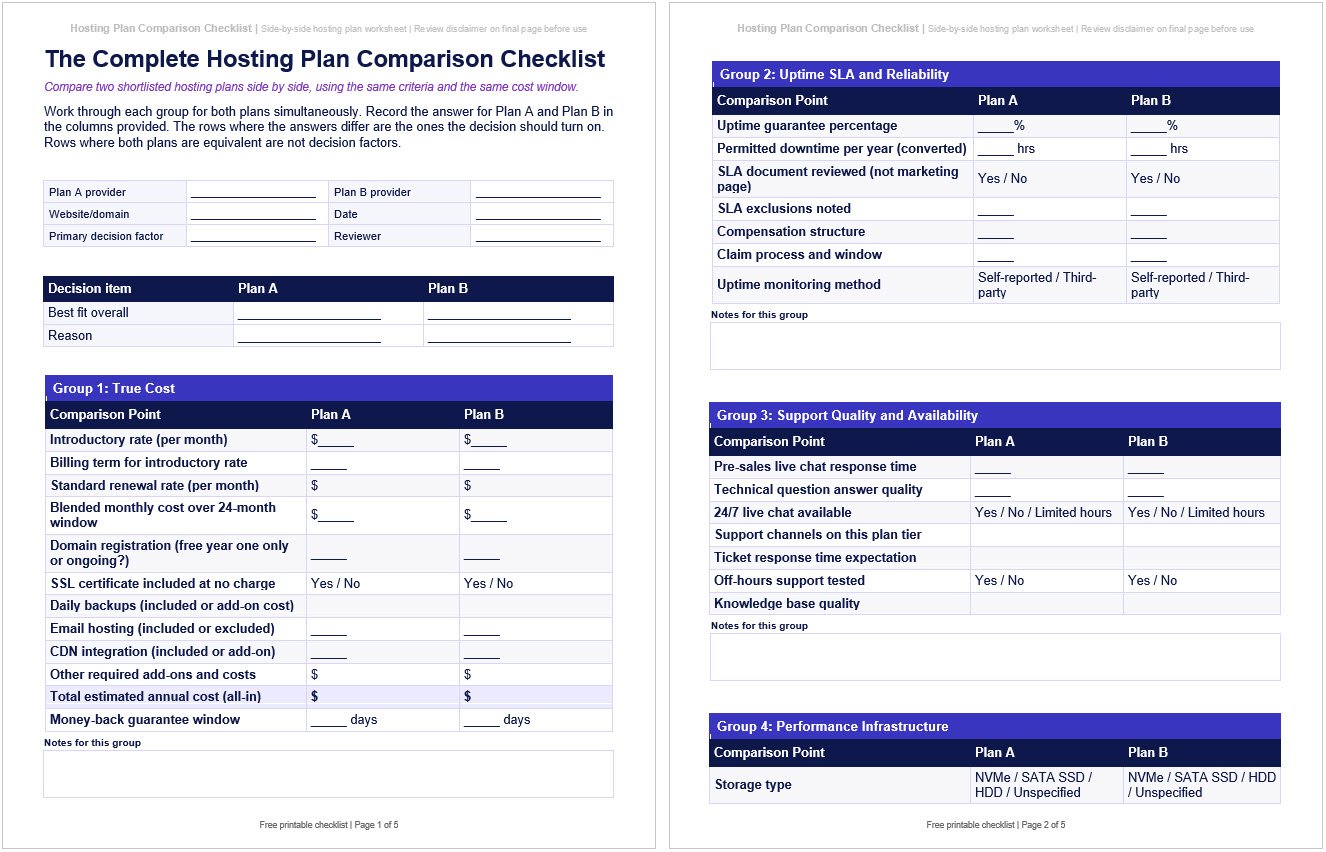
The complete checklist below is available as a free download in PDF and editable Word format. Fill it in for two plans side by side, or print two copies and complete one for each plan you are evaluating.
Both versions include all checklist items across the six comparison groups, with a column layout designed for recording answers for Plan A and Plan B simultaneously. The Word version is fully editable so you can add your own notes and comparison criteria specific to your situation.
Key Takeaways
- Comparing plans on introductory price alone is comparing the wrong number; the blended monthly cost over the same comparison window is the figure that reflects what you will actually pay
- Add-ons that seem minor individually (domain renewal, daily backups, email hosting, CDN) can shift the total annual cost significantly when compared correctly between plans
- Two plans can quote identical uptime percentages and have very different SLA terms; the exclusions determine how meaningful the guarantee actually is
- Support quality is one of the most variable features across the hosting industry and the one most reliably tested by asking a specific technical question before purchasing
- A plan with no clear upgrade path is a plan you will eventually migrate away from under pressure; upgrade path clarity is a legitimate comparison criterion
- Storage type and caching layer availability are infrastructure differences that do not always appear in plan summaries but directly affect the performance ceiling of each plan
- Email hosting inclusion versus exclusion can reverse the cost advantage of a cheaper plan when a separate email service is factored in
There is a specific moment in the hosting selection process that most decision frameworks do not serve well.
You have done the research. You have narrowed it down to two plans.
They both look reasonable on paper and the difference between them is not immediately obvious from the marketing pages.
That is the moment this checklist is designed for.
The problem with comparing hosting plans at the final stage is that the most important differences are rarely visible on the pricing page.
One plan includes daily backups; the other charges for them.
One includes email hosting; the other does not.
One has a clear one-click upgrade path; the other requires a manual migration to move to a higher tier.
These differences are real, they compound over time and they are almost never featured prominently in plan marketing.
This checklist is distinct from the pre-purchase hosting verification checklist, which covers what to confirm before shortlisting a provider at all.
It is also distinct from a hosting plan selection guide, which helps you determine what type and tier of plan you need in the first place; that decision process is covered in how to select the best hosting plan for your specific needs.
This checklist assumes you already have two plans in front of you and need a structured way to evaluate them on equal terms.

Group 1 - True Cost Over Two Years
Price is the first thing most people compare and the thing they compare least accurately.
Introductory rates in the hosting industry are promotional prices that apply only to the first billing term.
They are not the long-term price of the plan; the renewal rate is the price that applies after the promotional term ends and is often significantly higher.
The formula for comparing plans honestly is the same for both: choose the same comparison window, add the total promotional cost and any renewal cost that falls within that window, then divide by the total number of months.
For example, over a 24-month comparison window, a plan at $3 per month for the first 12 months that renews at $13 per month for the next 12 months costs $8 per month on a blended basis.
A plan at $6 per month for the first 12 months that renews at $9 per month for the next 12 months costs $7.50 per month on a blended basis.
The cheaper-looking plan is actually more expensive over time.
Beyond the base rate, map out every add-on that your site actually requires: domain registration (often free for year one only), SSL certificate (should be included at no charge on any credible plan; if it is not, note the annual cost), daily automated backups (included on some plans, a paid add-on on others), email hosting (included on many shared plans, excluded from many managed WordPress plans), CDN integration (included or add-on depending on the plan) and any security tools or staging environments you need.
The mistake I see most often at this stage is someone comparing the 36-month introductory rate of one plan against the 12-month introductory rate of another, because that is how the providers display them.
On a consistent 24-month window, the plan that looked $4 cheaper was actually $11 more expensive once a paid daily backup, a domain renewal and a separate email service were accounted for.
The comparison window is where most people get this wrong.
Full guidance on what different plan types should cost and how fee structures work is at how much web hosting should actually cost and how website hosting fees are calculated and structured.

Group 2 - Uptime SLA and Reliability Terms
A 99.9% uptime guarantee permits up to 8 hours and 45 minutes of downtime per year.
A 99.99% guarantee permits approximately 52 minutes.
Both are commonly advertised.
Neither number tells you very much until you read the service level agreement that sits behind it, because the exclusions in most SLAs cover the majority of real-world downtime scenarios.
Scheduled maintenance windows are typically excluded from SLA calculations, meaning planned outages during off-peak hours do not count against the guarantee.
Outages caused by customer-side actions, third-party service failures and force majeure events are also typically excluded.
The compensation structure matters too: most SLA credits are small account credits rather than cash refunds and require a claim to be filed within a specific window with documented evidence of the outage.
A credit of one day’s hosting fee for eight hours of downtime is not a meaningful guarantee for a site where downtime has a direct business cost.
When comparing two plans: pull the SLA document for each, not the marketing summary page.
Compare the actual exclusion list, the credit calculation method and the claim process.
Also note how uptime is measured: provider self-reporting is less reliable than third-party monitoring.
If one plan uses independent uptime monitoring and the other self-reports, that is a meaningful reliability difference that the headline percentage does not capture.

Group 3 - Support Quality and Availability
Support quality is one of the most variable features in the hosting industry and one of the features that matters most at the worst possible moment.
It is also the feature most easily evaluated before purchase and most consistently skipped during the comparison process.
The test I use consistently when evaluating any hosting provider is a targeted pre-sales technical question via live chat.
Not a general inquiry about pricing or plan features; those can be answered by a script.
A question like “what server-level caching does this plan include and does it support Redis object caching” or “if a WordPress update breaks my site, can I restore a single database table from a backup without a full site rollback” requires a support agent to actually know their infrastructure.
The question about restoring a single database table without a full site rollback is one I use intentionally because the answer almost always reveals whether the agent has actually worked with the hosting environment or is reading from a knowledge base.
The ones who know their stack answer immediately and often follow up with what the process looks like in the control panel.
The ones who do not redirect to a documentation link or say they will need to check with a technician.
Run this test for both plans you are comparing, ideally at different times of day.
Note how long it takes to connect to a live agent, whether 24/7 live chat is actually available or limited to business hours, whether the answer is accurate and specific to your question and whether the agent follows up with additional relevant information.
A plan that is cheaper per month but delivers scripted non-answers during a critical incident is not the better value.
Also compare the support tier available on each plan.
Some plans gate phone support, priority queue access or dedicated support to higher tiers.
If the plan you are evaluating includes only ticket-based support with no live option, that is a constraint worth comparing explicitly against the alternative.

Group 4 - Performance Infrastructure
Performance differences between plans are often invisible on the pricing page and significant in practice.
The specifications worth comparing explicitly are the ones that determine the performance ceiling of each plan regardless of how well the site itself is optimized.
Storage type
NVMe SSD, SATA SSD and HDD are not equivalent.
As IBM’s comparison of NVMe and SATA explains, NVMe storage generally offers higher throughput and lower latency than SATA SSD storage, which can matter for dynamic CMS sites where uncached page requests involve disk access and database activity.
If both plans list “SSD storage” but one specifies NVMe and the other does not, the distinction is worth noting.
If neither specifies, ask directly before assuming they are equivalent.
The full breakdown of how storage type affects site performance is in our hosting infrastructure speed audit checklist.
Caching layers
Full-page caching, OPcache for PHP bytecode and Redis or Memcached for object caching are three distinct performance layers.
Full-page caching and OPcache are useful baselines for most dynamic CMS sites, while Redis or Memcached becomes especially valuable for WooCommerce, membership sites and database-heavy WordPress sites.
The pattern I see consistently is that plans advertising “server-level caching” often mean full-page caching only, with OPcache and Redis treated as separate questions.
When evaluating a plan, I ask about all three explicitly rather than assuming “caching included” covers the full stack.
Compare which layers each plan includes as standard versus which are available as a paid add-on or not available at all.
HTTP protocol version
HTTP/2 is a reasonable modern baseline.
HTTP/3 with QUIC is increasingly available on modern hosting stacks and can reduce connection overhead, especially on mobile, lossy or high-latency connections.
Confirm whether each plan supports HTTP/2 or HTTP/3, but keep in mind that a provider’s demo site may not always reflect the exact stack used for your purchased plan.
Server location
If your audience is geographically concentrated, confirm which data center regions each plan offers and whether you can specify a region at signup or are assigned one automatically.
Geographic distance between the server and your visitors creates network latency that no amount of optimization eliminates.
Resource limits under load
On shared hosting plans, the most important performance question is not the advertised resource allocation but what happens when you hit the plan’s limits.
Some plans throttle CPU at a soft ceiling; others throw 503 errors.
Some plans handle traffic spikes by queuing requests; others drop them.
This is worth asking support directly: what happens to my site when it hits the concurrent connection limit or CPU threshold on this plan?
The answer reveals how the plan actually behaves under conditions the marketing page does not describe.
The relationship between hosting infrastructure and real-world performance is covered in depth in how your hosting environment determines your site’s speed ceiling.

Group 5 - Plan Features and Included Services
The features in this group are the ones that most commonly produce an unpleasant surprise after signup.
They are usually not prominent in plan marketing, they differ significantly between providers and they affect day-to-day usability in ways that matter more than the headline resource allocations.
Email hosting
Many traditional shared hosting plans include professional email at your domain as a standard feature.
Many managed WordPress plans exclude email hosting and expect you to use a separate email provider.
If email is not included and you need it, you will need a separate email service on top of the hosting cost.
This can easily reverse the cost advantage of a plan that looks cheaper on the surface.
Confirm explicitly whether email hosting is included for both plans you are comparing, and if excluded, budget the cost of a separate email service before finalising the comparison.
Staging environment
A staging environment lets you test plugin updates, theme changes or major site changes on a copy of your live site before pushing to production.
It is a meaningful quality-of-life feature for any actively maintained site.
Compare whether each plan includes staging as a standard feature, as a paid add-on or not at all.
The difference in day-to-day risk management between a plan with one-click staging and one without it is significant for WordPress sites with active development or frequent updates.
Upgrade path
A hosting plan you cannot outgrow cleanly is a plan that creates a forced migration at an inconvenient time.
Compare how each plan handles growth: can you upgrade to a higher resource tier within the same account without migrating, or does moving to a better plan require a new account setup and a full site migration?
What I have found is that upgrade path questions tend to get vague answers from sales agents who have not actually managed a migration between plan tiers on their own platform.
The specific question worth asking is: if I upgrade from this plan to the next tier, does my site stay on the same server or does it move, and is there any downtime involved?
That answer tells you whether the upgrade path is genuinely seamless or just a pricing tier change.
The full context on what to consider when a plan no longer fits your site is in how to evaluate whether a hosting provider can grow with your site.
Migration assistance
If you are moving an existing site to the new host, compare the migration policy for each plan.
Some plans include free assisted migration as a standard feature; others provide migration tools but no hands-on help; others charge for migration.
If a migration is involved, this comparison point can add a real dollar figure to one plan’s cost that does not appear in its pricing.
Control panel
The control panel is where you will live day to day in your hosting account.
Compare which panel each plan uses and whether a demo environment is available to test before committing.
If both plans use the same panel, this comparison point is neutral.
If one uses a proprietary panel with limited documentation and the other uses a widely supported panel with an extensive knowledge base, that difference in day-to-day usability is worth factoring in.
Number of sites permitted
Some plans cover a single domain; others allow unlimited sites on the same account.
If you anticipate hosting more than one site now or in the near future, compare this explicitly.
A plan that looks more expensive but covers multiple sites may be cheaper in total than two separate accounts on a cheaper single-site plan.

Group 6 - Security and Backup Coverage
Security and backup features vary enough between plans that they warrant an explicit side-by-side comparison rather than being assumed equivalent.
Several items that should be standard across the industry are still add-ons or unavailable on some plans.
SSL certificate
A free SSL certificate via Let’s Encrypt or equivalent should be included on any credible plan in 2026 at no additional charge.
If either plan charges for basic SSL, note that as a red flag and add the annual cost to the comparison.
Also confirm auto-renewal is included rather than requiring manual action each year.
Daily automated backups
Compare backup frequency, retention window (how many days of restore points are available), restore method (self-service from the control panel versus requiring a support ticket) and whether there is a charge per restore.
Daily backups are a reasonable baseline for many business websites, while ecommerce, membership or frequently updated sites may need more frequent backups.
One pattern worth noting here: restore method is the backup feature that causes the most frustration in practice.
A plan advertising daily backups that requires a support ticket and a 24-hour turnaround for a restore is not meaningfully useful during a security incident or a broken plugin update at 9pm on a Friday.
Self-service restore from the control panel is the only version that is actually available when you need it most.
A plan that includes daily backups with 14 days of retention and self-service restore is meaningfully better than one that offers weekly backups requiring a support ticket, even if both advertise “backup included.”
For a detailed look at what a complete backup verification process involves, our monthly hosting maintenance checklist covers backup testing as part of a recurring routine.
Malware scanning
Note whether either plan includes server-level malware scanning as a standard feature or whether this requires a third-party security plugin.
A plan that includes scanning as part of the hosting environment provides an additional layer of protection that a plugin-only approach cannot fully replicate.
Firewall and DDoS protection
Compare whether each plan includes a Web Application Firewall (WAF) at the infrastructure or edge level, or whether protection depends on a plugin installed inside the site.
Edge or infrastructure-level protection can block malicious traffic before it reaches the origin server, while plugin-based protection operates after the request reaches the application.
For a full reference on what a complete hosting security posture should include, our hosting environment security checklist covers the full stack.
Money-back guarantee
Compare the guarantee window, what it excludes (domains and add-ons are commonly excluded) and how to initiate a claim.
A longer money-back window gives you more time to confirm the plan performs as expected before the decision becomes final.

The Complete Hosting Plan Comparison Checklist
Work through each group for both plans simultaneously. Record the answer for Plan A and Plan B in the columns provided. The rows where the answers differ are the ones the decision should turn on. Rows where both plans are equivalent are not decision factors.
This checklist is available as a free downloadable PDF and editable Word document above at Hosting Comparison Checklist Download.
Group 1: True Cost
|
Comparison Point |
Plan A |
Plan B |
|
Introductory rate (per month) |
$_____ |
$_____ |
|
Billing term for introductory rate |
_____ |
_____ |
|
Standard renewal rate (per month) |
$_____ |
$_____ |
|
Blended monthly cost over 24-month window |
$_____ |
$_____ |
|
Domain registration (free year one only or ongoing?) |
_____ |
_____ |
|
SSL certificate included at no charge |
Yes / No |
Yes / No |
|
Daily backups (included or add-on cost) |
_____ |
_____ |
|
Email hosting (included or excluded) |
_____ |
_____ |
|
CDN integration (included or add-on) |
_____ |
_____ |
|
Other required add-ons and costs |
$_____ |
$_____ |
|
Total estimated annual cost (all-in) |
$_____ |
$_____ |
|
Money-back guarantee window |
_____ days |
_____ days |
Group 2: Uptime SLA and Reliability
|
Comparison Point |
Plan A |
Plan B |
|
Uptime guarantee percentage |
_____% |
_____% |
|
Permitted downtime per year (converted) |
_____ hrs |
_____ hrs |
|
SLA document reviewed (not marketing page) |
Yes / No |
Yes / No |
|
SLA exclusions noted |
_____ |
_____ |
|
Compensation structure |
_____ |
_____ |
|
Claim process and window |
_____ |
_____ |
|
Uptime monitoring method |
Self-reported / Third-party |
Self-reported / Third-party |
Group 3: Support Quality and Availability
|
Comparison Point |
Plan A |
Plan B |
|
Pre-sales live chat response time |
_____ |
_____ |
|
Technical question answer quality |
_____ |
_____ |
|
24/7 live chat available |
Yes / No / Limited hours |
Yes / No / Limited hours |
|
Support channels on this plan tier |
_____ |
_____ |
|
Ticket response time expectation |
_____ |
_____ |
|
Off-hours support tested |
Yes / No |
Yes / No |
|
Knowledge base quality |
_____ |
_____ |
Group 4: Performance Infrastructure
|
Comparison Point |
Plan A |
Plan B |
|
Storage type |
NVMe / SATA SSD / HDD / Unspecified |
NVMe / SATA SSD / HDD / Unspecified |
|
Full-page caching |
Server-level / Plugin-level / Not included |
Server-level / Plugin-level / Not included |
|
OPcache |
Included / Not confirmed |
Included / Not confirmed |
|
Redis or Memcached object caching |
Included / Add-on / Unavailable |
Included / Add-on / Unavailable |
|
HTTP protocol version |
HTTP/2 / HTTP/3 |
HTTP/2 / HTTP/3 |
|
Server location options |
_____ |
_____ |
|
Resource limit behaviour under load |
Throttling / Queuing / 503 errors |
Throttling / Queuing / 503 errors |
|
PHP version options |
_____ |
_____ |
Group 5: Plan Features and Included Services
|
Comparison Point |
Plan A |
Plan B |
|
Email hosting included |
Yes / No |
Yes / No |
|
Staging environment |
Included / Add-on / Unavailable |
Included / Add-on / Unavailable |
|
Upgrade path |
In-account / New account required |
In-account / New account required |
|
Migration assistance |
Free / Tools only / Charged |
Free / Tools only / Charged |
|
Control panel |
_____ |
_____ |
|
Number of sites permitted |
_____ |
_____ |
|
One-click CMS installer |
Yes / No |
Yes / No |
|
Storage allocation |
_____ |
_____ |
|
Bandwidth or data transfer limit |
_____ |
_____ |
|
RAM allocation (VPS or dedicated) |
_____ |
_____ |
Group 6: Security and Backup Coverage
|
Comparison Point |
Plan A |
Plan B |
|
SSL included at no charge |
Yes / No |
Yes / No |
|
SSL auto-renewal included |
Yes / No |
Yes / No |
|
Backup frequency |
Daily / Weekly / _____ |
Daily / Weekly / _____ |
|
Backup retention window |
_____ days |
_____ days |
|
Restore method |
Self-service / Support ticket |
Self-service / Support ticket |
|
Restore cost |
Included / $_____ per restore |
Included / $_____ per restore |
|
Malware scanning |
Included / Not included |
Included / Not included |
|
WAF or firewall protection |
Infrastructure-level / Plugin-only |
Infrastructure-level / Plugin-only |
|
Two-factor authentication on account |
Available / Not available |
Available / Not available |
Still Not Sure Which Plan Is the Right One?
Running through this comparison systematically usually makes the decision clear.
Where two plans are genuinely equivalent across every group, the tiebreaker is usually support quality tested directly and upgrade path clarity confirmed explicitly; both are easy to evaluate and both matter more over time than any feature that sounds impressive on a pricing page.
If you are working through this comparison and want a second opinion on what the answers actually mean for your specific site, that is exactly the kind of question we help with at Web Hosting Services.
Describe your site, your current situation and the two plans you are comparing, and we will tell you which one fits better and why.
Contact us and we will give you a straight answer rather than a generic recommendation.
References & Additional Resources
- Uptime.is. “Uptime Calculator.”
- Let’s Encrypt. “Documentation.”
- Cloudflare. “What Is a CDN?” Cloudflare Learning Center.
- ICANN. “Domain Name System (DNS) Resources.”
- IBM. “NVMe vs SATA.” IBM Think.
- HTTP.dev. “HTTP/3 Explained.”
Tagged In:
- Hosting Comparison, Hosting Costs, Hosting Decision Making, Hosting Evaluation, Hosting Features, Hosting Fundamentals, Hosting Performance, Hosting Plans, Hosting Providers, Hosting Reliability, Hosting Reviews, Hosting Security, Hosting Selection, Hosting Speed, Managed Hosting, Server Resources, Shared Hosting, VPS Hosting, Web Hosting, Website Hosting
Disclaimer: Hosting plan features, pricing structures, renewal rates, SLA terms, included services and infrastructure specifications vary by provider and can change over time. This checklist, including any downloadable versions, is provided for informational purposes only and does not constitute professional technical or financial advice. Always verify current plan details, renewal rates and feature availability directly with each hosting provider before purchasing. Web Hosting Services makes no guarantees regarding outcomes based on use of this checklist in any format.